Distinguish the two storage areas
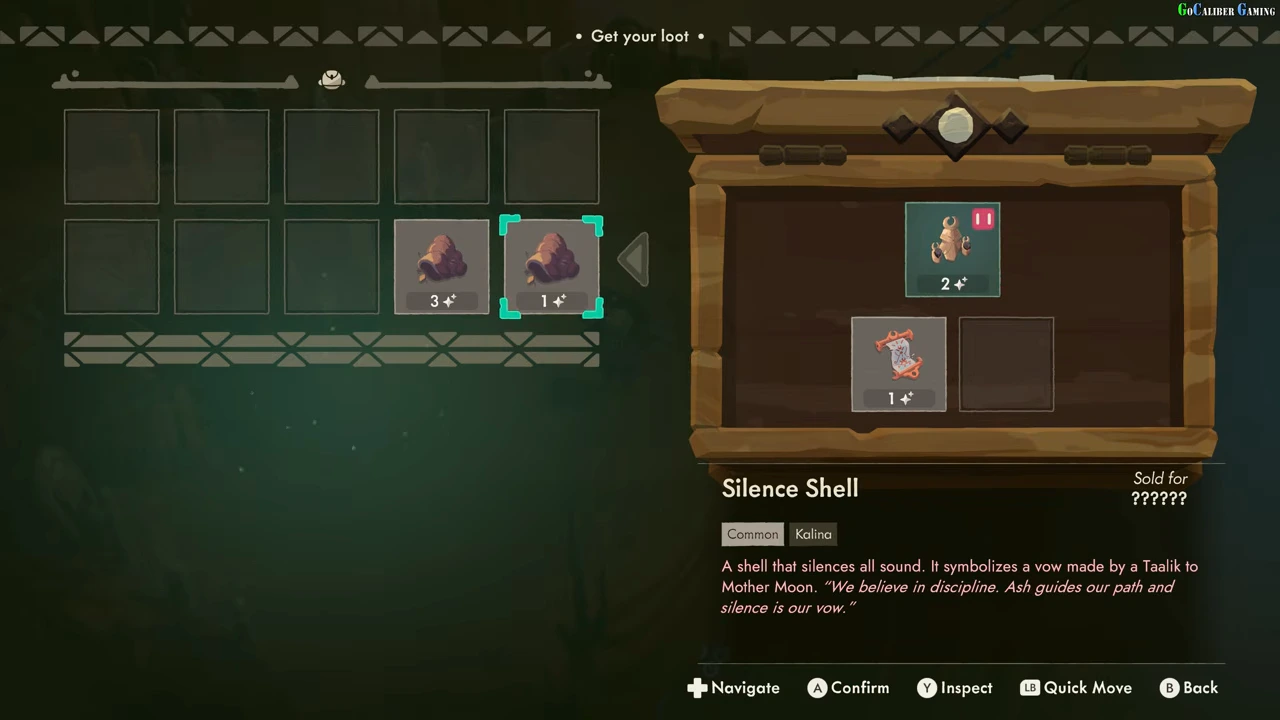
The chest on the right holds offered loot; the grid on the left is Will’s backpack. Selecting an item reveals its name and tags below the chest. In the observed example, Silence Shell is tagged Common and Kalina.
Read Quality separately from sale value
The sparkle number attached to the selected Silence Shell is 1 in this frame. Its Sold for field is still question marks. The sparkle value is Quality in the tutorial’s terminology, not a confirmed coin price. Copies of the same shell in the backpack show different Quality values.
Move and verify
Use the displayed Confirm or Quick Move control to transfer the intended relic into a free backpack slot. Check its icon and Quality on the left before closing. The recording later uses carried relics in the shop, where pricing is handled in Showcase.
Inspect special effects before arranging
Later tutorials explain that some relics have curses or effects when burned. Use Inspect on the selected relic before assuming an item is safe to place anywhere. This page covers the basic transfer, not a complete curse list or a demonstrated optimal backpack combination.
Look up the three documented relic records
This is a finite record set, not a complete relic roster. Match the name and the context before using an effect or Quality value. The version entries describe how the source recordings are labelled; they are not a new client test on every platform.
| Relic and visible tags | Observed record | Version evidence | Unknown in this record |
|---|---|---|---|
| Silence Shell — Common, Kalina | Selected copy has Quality 1; another carried copy has Quality 3. Sold for remains question marks. | Video labelled 1.0, published September 5, 2026 | Confirmed selling price; a fixed Quality shared by all copies |
| Mother Figure — Uncommon, Kalina | Left-Right tooltip: +6 Quality to relics in the same column. The demonstrated placement changes its own Quality 2→8. | Video labelled 1.0, published September 5, 2026 | All occupied-column targets; repeated activation; selling price |
| The Song of Welcome — Rare, Kalina | Corner tooltip: Armor and +4 Quality to the same row. Four receivers change 4, 2, 6, 4→8, 6, 10, 8; the Song stays 2. | Video labelled 1.0, published September 7, 2026 | Armor tested against a later burn; repeated activation; selling price |
Use a record only for the state it demonstrates
Start with the exact relic name, then compare its condition and target direction. A before-placement preview and the confirmed backpack state are separate records. For a different build, date your new observation and preserve any changed tooltip rather than silently overwriting the older result.
The screenshots establish these particular placements and readouts. They do not supply a complete price list, a guarantee that every effect applies to its own source relic, or proof that an old value remains unchanged in your current save.